Fundraising reports by Fiscal instead of Calendar Year

I like the predeveloped reports that Keela can produce regarding your fundraising outcomes but it only includes Calendar Year metrics and I can't seem to find a way to alter it to our Fiscal Year (calendar year does not help my board). Is the only way to run fiscal reports by through the reports function and manually set dates? It's a shame the predeveloped report can't be used as it does look good and supplies all the info my board wants - would love too be able to work with it.
Any suggestions and/or direction is greatly appreciated! Thanks!!
-
I am specifically referring to the one-click fundraising report.
0 -

Can't you add a filter and pick "between" and set those dates manually? When I do that, it seems to keep the filter if I leave that report and go to another one then come back to the first one.
0 -
I can't for the one-click fundraising report - it only offers the option of multiple years to include as a drop-down. For manually generated report, yes, I can enter pick between, but I was hoping to utilize the ability to use the one-click as it includes all the info my board wants without me having to run multiple reports to create a manual report for their use. Pamela Giles can you select specific timeframes for the one-click fundraising report? If so, it must be something in the setup of my system, and that's what I'm trying to determine.
0 -
I can't when I create the one-click one, but once it's created, I can add a filter to any of the individual reports. If I save that report, it saves the filters so when I go back and look at it again they're still there.
0 -
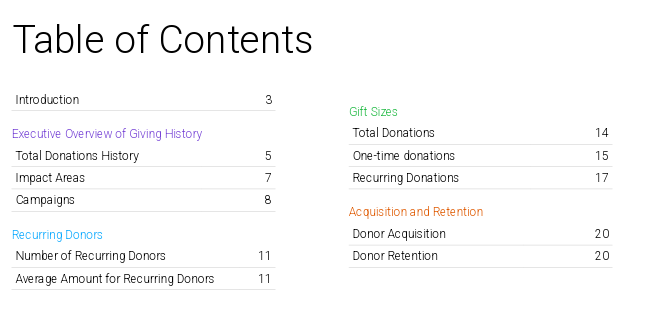
Pamela Giles, I think we are talking about two different reports. The one-click report I'm referring to seems to be a canned report that doesn't provide any way to make changes or edits to the individual reports it draws on. It is a "designed" report (PDF file on completion) with table of contents, header pages, stats, charts, etc for different areas - cut of the table of contents below. This is literally a one-click reporting solution, and would be fabulous one could alter the year from Calendar to Fiscal. Is the report you are referring to the same? I can't find a way to edit any of the data tables or parameters once the report is run and the PDF created.
 0
-
Oh, yeah, you can do very little to customize the One-Click Fundraising Report accessed through Transactions. It has no filters at all, not even the ability to exclude particular funds or campaigns.
That report would be a lot more useful if we could customize it better.
0 -
100% agree. At least I'm glad to know I'm not missing something! Happy Friday, Pamela Giles, and thanks for helping me figure out there's no solution to my problem with this report!
0 -
Shout out to the new Mission Report Tool that includes Fiscal year over year reporting. This is very helpful and comes closer to what I need. Thank you!
One request for improvement is that it would be great to include clickable links to be able to get a report for the background data (eg: a clickable link that allows the donor list, amounts and dates for the respective year) so that the data can be easily verified and provides an easy access to the donor list. this would also allow us to ensure all gifts have been recorded across all of our campus locations.
0 -
Darn, I spoke too soon. This report doesn't include All Transactions. Sigh. I need a fiscal year to year report that includes Revenues as well as Donations. Without this, the report isn't much help to me as we have a substantial amount of our funding in Revenues and we can't assess year to date accurately without these figures.
0 -
I had high hopes that the new Keela AI could help create this report, or that the generated report would be able to be revised, but it does not seem to be able to interpret between year-over-year transactions (versus donations only) for the current and past year. I'm back to having to manually create my own reports. I don't have time to further try to train the AI after multiple attempts so I'm giving up again.
0
Please sign in to leave a comment.
Comments
10 comments